Bringing Clarity to Complex Workflows

Our mission is to help learners develop skills in analyzing, designing, and documenting AI workflows. We combine sequential explanations, examples, and learning activities so detailed scenarios can be explored at a comfortable pace.

  • GitHub logo with a black circle and white silhouette of a cat.
  • LinkedIn logo on a white background
  • Black circle with a white 'M' in the center

Orqivo Began with One Practical Question

Orqivo began with the aim of explaining AI Workflow Automation without information overload. While working with recurring tasks, databases, and connected scenarios, our team started creating learning materials that show how events, conditions, information, and actions form a complete workflow.

  • Cherry Strong

    Cherry Strong

    AI Operations Planner

    Cherry defines workflow

    sequences, assigned roles, and

    human review points. She

    coordinates automated and

    manually reviewed stages within

    the same scenario.

  • Dan Patton

    Dan Patton

    AI Workflow Architect

    Dan designs structures in which

    events, conditions, and actions

    form connected scenarios. He

    also defines module boundaries

    and the rules governing their

    interaction.

  • Teresa White

    Teresa White

    AI Process Review Coordinator

    Teresa prepares scenarios for

    examining central routes,

    conditions, delays, and irregular

    states. She documents the

    expected behavior and outcome

    of each workflow stage.

See How Orqivo Courses Are Structured

See how Orqivo courses are organized and which topics are covered across their modules. Review sample diagrams, learning activities, and explanations before selecting a program. Each course offers a different level of detail and focuses on a particular stage of AI Workflow Automation. Select Preview Courses to compare the learning paths and their contents.

  • A stylized 3D network or circuit diagram on a white background, featuring a central dark gray square connected to six circular nodes with cyan and purple accents, plus cyan arrows indicating flow.

    Workflow Logic

    The materials explain

    how to identify

    starting events,

    conditions,

    information routes,

    and closing states.

  • A 3D digital icon of a checklist with gray and light blue lines and checkmarks on a dark gray rounded square, isolated on a white background.

    Working Scenarios

    Examples demonstrate how learning concepts relate to recurring administrative, and creative tasks.

  • A stylized digital icon of a futuristic cross-shaped geometric emblem with dark gray facets and glowing blue and purple outlines on a white background.

    Downloadable Materials

    Files can be

    stored on a

    compatible

    device and

    reviewed

    offline.

  • A futuristic circular device with four dark gray square nodes connected by glowing cyan curved bands, each node featuring a circular light that is illuminated in a different color, shown on a solid white background.

    Flexible Pace

    Learners can

    plan their own

    study sessions

    and return to

    individual modules

    when convenient.

  • Randy Benton

    Randy Benton

    Randy worked with recurring administrative tasks but

    found it difficult to identify where a process began,

    which actions were repeated, and when an additional

    review was needed. He found the sequential module

    design, conditional-route examples, and workflow-map

    format especially useful because he could revisit them

    while examining his own process.

    “The materials helped me divide one large process

    into separate stages and describe the connections

    between them more precisely.”

  • Cole Henderson

    Cole Henderson

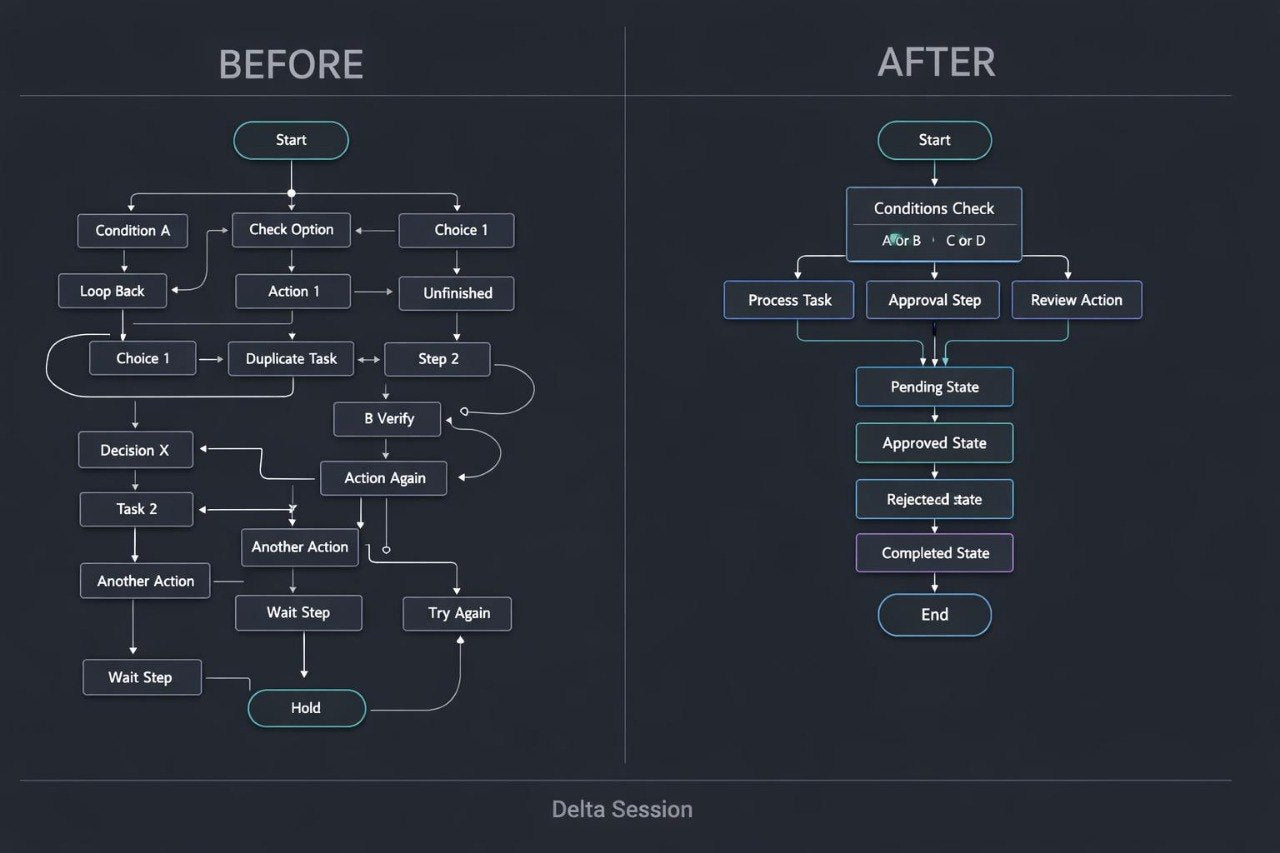
    Cole had already created basic diagrams

    but encountered difficulties when a process included

    several conditions, alternative routes, and repeated

    actions. He appreciated the modular format, concise

    explanations for each block, and examples showing

    how recurring actions could be combined within

    one shared workflow section.

    “What I valued most was being able to examine

    a detailed diagram in smaller parts without losing

    the overall logic.”

30-Day Money-Back Guarantee

Try the course risk-free. If you're not satisfied for any reason, get a full refund. No questions asked. Refund requests may be submitted within 30 days in accordance with our Refund Policy.

  • A black rectangular tablet or monitor centered on a white background, displaying a digital interface with the text 'Cryst Blueprint' on a purple panel.
  • A silver laptop with a black screen displaying a digital course or presentation titled 'Delta Session' on a plain white background.
  • A hand holding a smartphone with a white case, displaying the Arc Framework logo on the screen against a plain white background.

Begin with a Selection of Open Materials

Begin exploring AI Workflow Automation with a complimentary collection of Orqivo materials. It includes introductory explanations, foundational concepts, and an example of a basic workflow map. The materials provide a closer look at the learning format and the approach used to build workflow scenarios. Receive the collection and study it according to your own schedule.