Orqivo
Arc Framework
Arc Framework
Couldn't load pickup availability
Self-paced learning overview
- 📥 Digital file available after purchase
- 🗂️ Long-term availability
- 🔒 Secure checkout
- 🗓️ Content updated in 2026
1. Problem Statement
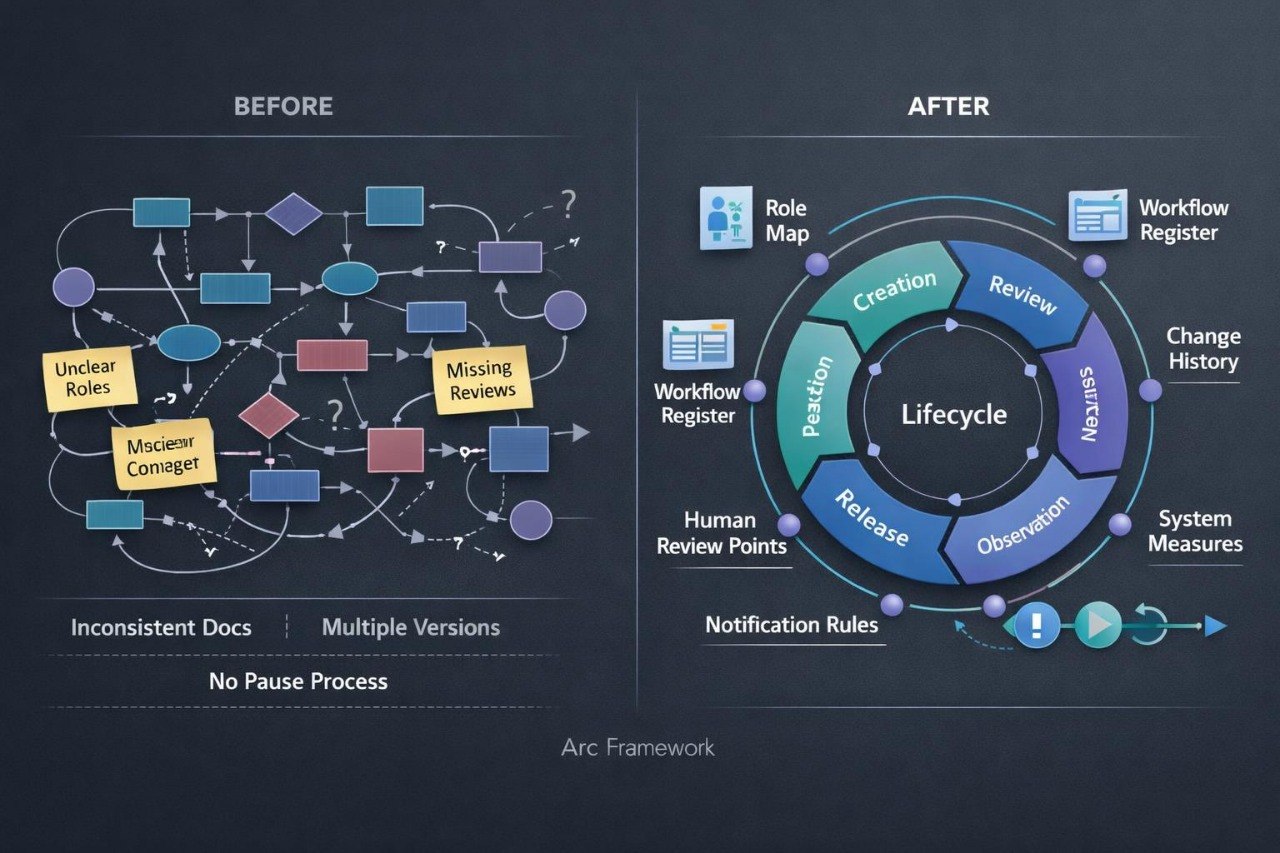
Struggling to control a system where several workflows change, interact, and depend on shared information? You are not alone: once an architecture expands, a new rule may affect routes that initially appeared unrelated. Team members may work from different documentation versions, interpret statuses differently, or remain unsure about who reviews a particular stage. Without a decision record and a defined change process, it can be difficult to understand why a workflow begins behaving differently. Arc Framework helps organize the system lifecycle through assigned roles, update rules, review measures, and one consistent documentation structure.
2. Solution
This course will teach you how to plan the management of a connected AI workflow system. You will define roles for design, review, approval, and change documentation. The materials explain how to create diagram versions, compare revisions, and identify the components affected by each update. You will also examine review measures, human checkpoints, pause rules, and process recovery procedures. The final activity involves building an Arc Framework containing a responsibility map, change register, state model, and system review plan.
3. What’s Inside
Module 1: Workflow Lifecycle
Examine the stages of scenario creation, internal review, testing, release, observation, and revision.
Module 2: Roles and Responsibilities
Define who creates diagrams, reviews rules, approves revisions, and examines irregular situations.
Module 3: Workflow Register
Prepare a structured list of scenarios containing names, purposes, owners, dependencies, and current states.
Module 4: Versions and Change History
Record version numbers, revision dates, reasons for updates, and the components affected by each change.
Module 5: Impact Analysis
Learn how to review connections before changing a rule and identify routes, information structures, and control states requiring another examination.
Module 6: Human Review Points
Identify situations where a workflow should pass a decision to a person, pause a route, or request additional information.
Module 7: Review Measures
Create measures for stage duration, repeated actions, irregular cases, and route completion.
Module 8: Notification Rules
Describe which states require attention, who should receive the information, and what details should be included.
Module 9: Pausing and Recovery
Define how an individual workflow can be stopped, how its current state is recorded, and how it can continue from a selected point.
Module 10: Scheduled System Review
Prepare questions for examining rule relevance, documentation quality, and alignment between the diagram and the operating scenario.
Module 11: Final Arc Structure
Combine the workflow map, assigned roles, change history, review measures, human checkpoints, and recovery process into one connected system.
4. Who Is This For?
✅ Suitable if you:
- have worked with an architecture containing several connected workflows;
- want to organize revisions and documentation;
- coordinate activities across several participants;
- plan to include human review points;
- want to observe workflow states and measures;
- are prepared to build a detailed management model.
❌ Not for you if you:
- are beginning to study workflow structure;
- have not worked with modules and dependencies;
- want a brief introduction without applied work;
- do not plan to create a register and supporting documentation;
- need a ready-made configuration for one organization.
5. What You’ll Learn
- Describe a workflow lifecycle using at least six stages.
- Create a responsibility map for four or more roles.
- Build a register containing at least five connected scenarios.
- Document versions, change reasons, and affected components.
- Complete an impact review before revising a rule.
- Define at least three human review points.
- Create a collection of six workflow measures.
- Write notification rules for different system states.
- Document a workflow pause and recovery procedure.
- Prepare a scheduled review plan for the complete system.
- Build a complete Arc Framework management model.
6. Refund Terms
Arc Framework includes a 30-day period for submitting a refund request. Requests are reviewed according to the terms published on the Orqivo website, including the purchase date, completed material, and other stated provisions.
7. Certificate
After completing the required modules and submitting the final model, learners may receive an Orqivo certificate. It records the Arc Framework title and completion of the assigned learning program.
1. What experience level are the courses designed for?
1. What experience level are the courses designed for?
The materials are structured to help learners study AI Workflow Automation in a logical sequence. Each tier has its own scope, topics, and level of detail, allowing learners to select a format that matches their current knowledge and learning goals.
2. How are the course materials presented?
2. How are the course materials presented?
Courses may include structured lessons, topic-based modules, written explanations, workflow examples, practice activities, and resources for independent study. The specific contents are listed in the description of each tier.
3. Do I need to install additional tools?
3. Do I need to install additional tools?
The courses focus on process logic, automation planning, and workflow structure. When an activity requires an additional tool, the relevant information will be provided within the course materials.
4. Is a certificate included?
4. Is a certificate included?
A certificate of completion may be provided after the required modules and assigned activities have been completed. It records completion of an Orqivo learning program but does not represent a professional license or government-issued qualification.
Share